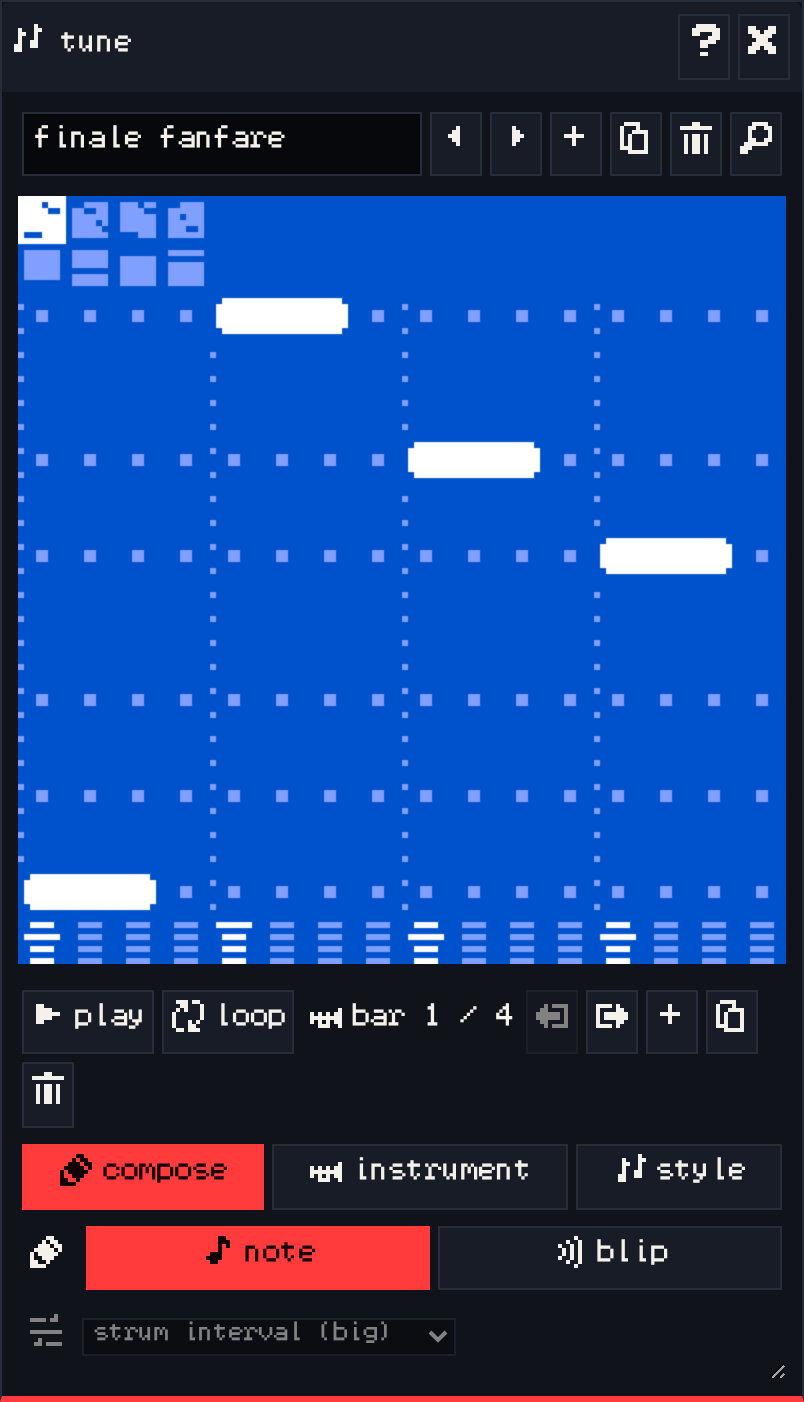
The tune window writes background music. A tune is made of bars; each room can play one tune, picked in the room window’s tune tab.
Playing and bars #
- play plays the tune from the selected bar, and loop repeats the current bar.
- bar 1 / 4 shows which bar is selected. The arrows move the bar left or right, + adds an empty bar at the end, the copy button duplicates the selected bar to the end, and the bin removes it.
compose #
Click and drag in the grid to draw notes. Higher rows are higher notes.
- note draws notes.
- blip inserts the selected blip as a note.
- The strum menu sets how chords are played: off, up, down, or with a big or small interval.
instrument #
Choose the tone of the melody and harmony: tone A (square wave), tone B or tone C (thinner pulse waves), and the harmony’s strum pattern.
style #
- speed: slow, medium, fast or turbo (60 to 160 bpm).
- mood: cheery (major key) or gloomy (minor key). Switching transposes the whole tune.
VGC Zero plays tunes on its two square-wave channels, so what you hear in the editor is close to the handheld.