🚀 Today we’re launching the Chili Room Editor — a focused, zero-install, in‑browser tool for building small retro‑style rooms for our sdk.
It’s intentionally minimal: drop in a tileset, paint two layers, export a deterministic C header. No build chain, no project scaffolding, no fluff.
TL;DR #
Use a 128px‑wide tileset → paint a 16×16 room (two layers) → export a ready‑to‑include header with static arrays. Fast loop, predictable output.
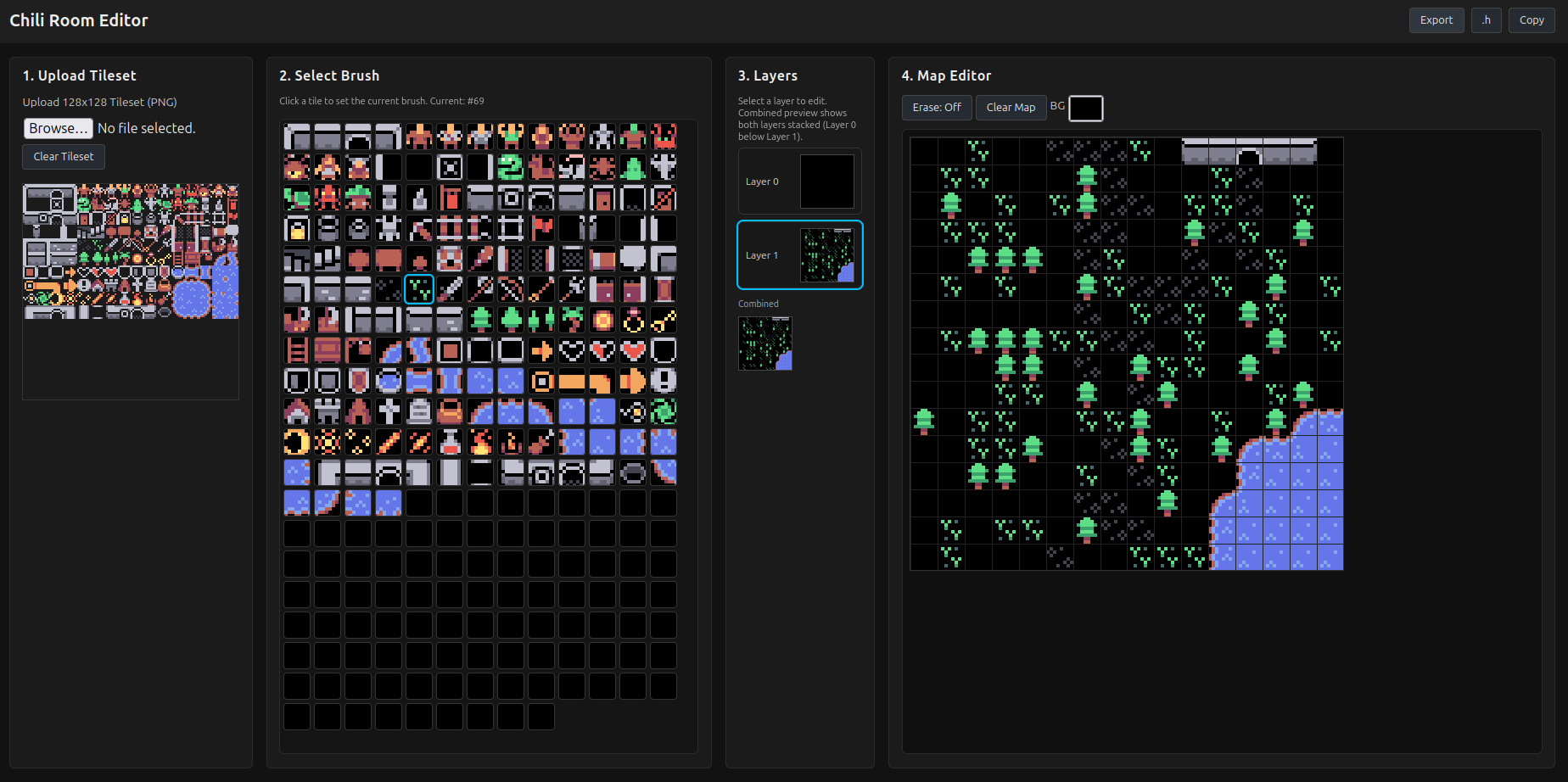
Chili Room Editor (initial release)
Launch Goals #
- Speed: iterate on room layouts in seconds.
- Determinism: exported header stays stable in git diffs.
- Zero friction: one page, no login, no server-side state.
Key Features (v1) #
Tileset Handling #
- PNG upload (must be 128px wide, height up to 128px).
- Selectable tile size: 8, 16, or 32 (must divide 128).
- Automatic slicing into a clickable palette.
- Safe re-slicing without losing existing map (out-of-range tiles auto-cleared).
- Local persistence of the tileset (base64 in storage) with a manual clear option.
Palette & Brush #
- Generated buttons for each tile.
- Visual highlighting of the active brush.
- Erase mode toggle (sets cells to -1).
Map Editing #
- Fixed 16x16 room grid.
- Pixel-crisp rendering (integer scaling, disables smoothing).
- Click & drag painting (mouse + touch).
- Background color picker (stored and exported as a hex literal).
- Grid overlay for alignment.
Layers #
- Two layers (0 = base, 1 = overlay).
- Layer switching buttons with highlight.
- Per-layer mini previews plus a combined composite preview.
- Clear current layer only (confirmation guarded).
Persistence #
- Tileset image, tile size, layers, and background color auto-saved.
- Legacy single-layer migration supported.
Export #
- Generates a C header snippet:
- Dimensions (
ROOM_W,ROOM_H) LAYER_COUNT- Background color literal
- One
static const intarray per layer (flattened row-major)
- Dimensions (
- Copy to clipboard, inline preview (alert), or direct
.hdownload.
Data Representation #
- Empty cell:
-1 - Arrays sized
ROOM_W * ROOM_H - Macro-friendly formatting for your engine.
Rendering Details #
- Layer order: lower index first.
- Palette and map both avoid interpolation.
- Device pixel ratio handling to reduce blur.
Quick Start #
- Export a 128px‑wide tileset (Aseprite etc.).
- Load it → choose tile size (8 / 16 / 32).
- Paint base layer (terrain) then overlay (objects / props).
- Pick a background color.
- Export header → drop into your project.
- Include arrays directly in your room loader.
Why It Helps (VGC / 32blit) #
- Removes manual tile index bookkeeping.
- Deterministic arrays keep diffs clean → easy reviews.
- Encourages small, memory‑friendly content chunks.
- Instant iteration before asset pipelines exist.
- Future‑proof: export format is scriptable for later tooling.
Roadmap (Planned / Candidate) #
- Collision mask layer
- Animated tile flags / frame groups
- Fill / rectangle / line tools
- Tileset metadata (naming / grouping)
- Multi‑room project export bundle
- Undo/redo (lightweight history ring)
- Optional compressed export (delta / RLE)
Known Limitations (v1) #
- No undo/redo yet
- Single fixed room size (16×16)
- Two layers only
- Raw int arrays (no compression)
- No collision or metadata layer yet
Export Format Snapshot #
Outputs a header with:
#define ROOM_W 16
#define ROOM_H 16
#define LAYER_COUNT 2
static const int ROOM_BG_COLOR = 0xFF0F0F0F; // example
static const int layer0[ROOM_W * ROOM_H] = { /* row-major data */ };
static const int layer1[ROOM_W * ROOM_H] = { /* row-major data */ };
Values are stable unless you repaint; re‑slicing prunes invalid tiles to -1.
Feedback Wanted #
If you try it and something slows you down—tell us. Highest priorities will be workflow friction, collision data, and multi‑room flows.
Try It Now #
Use it directly in your browser—no install:
Open the Room Editor